使用的是套装配套的1.85寸的AMOLED屏
烧录的固件选择的SF32LB52-DevKit-Nano: sf32lb52-nano_52j.zip
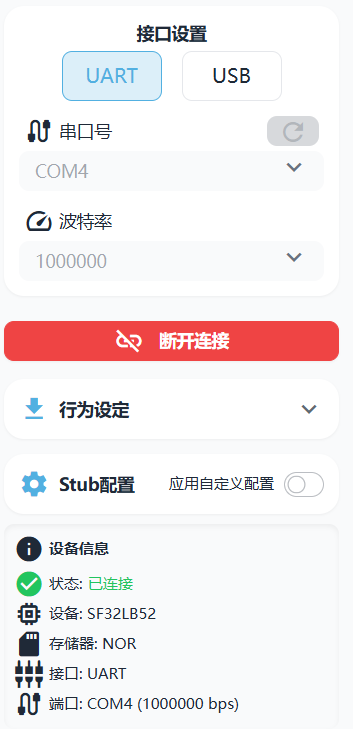
然后这是重新再次烧录的日志
[23:45:22] 系统就绪
[00:10:02] 已移除读取任务
[01:03:20] 检测到文件拖拽进入窗口
[01:03:21] 检测到文件拖拽释放
[01:03:21] 解析结果: 检测到 1 个文件路径
[01:03:21] 处理文件: sftool_param.json (路径: D:\SF\Datasheet\sf32lb52-nano_52j\sftool_param.json)
[01:03:21] 检测到sftool配置文件
[01:03:21] 正在解析配置文件…
[01:03:21] 配置文件解析成功
[01:03:21] 从配置文件提取了 6 个文件
[01:03:21] 已选择文件: 拖拽添加了 6 个文件
[01:03:21] - bootloader.bin (56.4 KB)
[01:03:21] - ER_IROM3.bin (3.9 MB)
[01:03:21] - ER_IROM1.bin (1.9 MB)
[01:03:21] - ER_IROM2.bin (3.8 MB)
[01:03:21] - dfu_pan.bin (1.4 MB)
[01:03:21] - ftab.bin (11 KB)
[01:04:30] [连接] 连接设备
[01:04:30] [连接] 完成
[01:04:30] [下载 Stub] 下载 Stub (开始)
[01:04:32] [下载 Stub] 完成
[01:05:04] 开始烧录会话
[01:05:04] 开始烧录…
[01:05:04] 准备烧录 6 个文件…
[01:05:04] 正在验证文件…: bootloader.bin
[01:05:04] 正在验证文件…: ER_IROM3.bin
[01:05:04] 正在验证文件…: ER_IROM1.bin
[01:05:04] 正在验证文件…: ER_IROM2.bin
[01:05:04] 正在验证文件…: dfu_pan.bin
[01:05:04] 正在验证文件…: ftab.bin
[01:05:04] 所有文件验证通过,开始烧录过程…
[01:05:04] [检查] 检查重下载 @ 0x12208000 (56.4 KB)
[01:05:04] [检查] 已跳过
[01:05:04] [检查] 检查重下载 @ 0x12460000 (3.9 MB)
[01:05:05] [检查] 已跳过
[01:05:05] [检查] 检查重下载 @ 0x12218000 (1.9 MB)
[01:05:05] [检查] 已跳过
[01:05:05] [检查] 检查重下载 @ 0x12AE0000 (3.8 MB)
[01:05:05] [检查] 已跳过
[01:05:05] [检查] 检查重下载 @ 0x12008000 (1.4 MB)
[01:05:06] [检查] 已跳过
[01:05:06] [检查] 检查重下载 @ 0x12000000 (11 KB)
[01:05:06] [检查] 已跳过
[01:05:06] 烧录完成!
[01:05:06] 烧录会话结束
之后我用VScode的SiFli-SDK-CodeKit 插件长按复位后,查看输出,显示电量为零。
SFBL
Serial:c2,Chip:4,Package:6,Rev:f Reason:00000000
Serial PowerOnMOde:0 rtc_record:00000000\ | /
- SiFli Corporation
/ | \ build on Dec 31 2025, 2.4.0 build 0d2de148
2020 - 2022 Copyright by SiFli team
mount /dev sucess
lwIP-2.1.2 initialized!
[I/FAL] Flash Abstraction Layer (V0.5.99) initialize success.
[I/FAL] The FAL MTD NOR device (dfu) created successfully
[I/FAL] The FAL MTD NOR device (ble) created successfully
[387] I/drv.rtc main: PSCLR=0x23565900 DivAI=35 DivAF=5526 B=256
[395] I/drv.rtc main: RC10K Freq=9kHz, cycle=1061200, rtc ppm=0[403] I/drv.rtc main: DIVA=35, DIVA_FRA=5527, DIVB=256
[410] I/drv.rtc main: Init RTC, wake = 1
[418] I/drv.audprc main: init 00 ADC_PATH_CFG0 0x606
[425] I/drv.audprc main: HAL_AUDPRC_Init res 0
[431] I/drv.audcodec main: HAL_AUDCODEC_Init res 0
[438] I/TOUCH main: Regist touch screen driver, probe=0x1226f4f9
[446] I/drv.rgb main: rgbled register success, supporting 1 LEDs
[455] I/drv.epic main: drv_gpu opened.
call par CFG1(3313)
fc 9, xtal 2000, pll 2105
call par CFG1(3313)
fc 7, xtal 2000, pll 1691
[508] I/audio audiosvr: audio server run
[514] I/audio bt_downv: audio_btdownlink run
msh />[pm]S:3,525
[pm]W:3236
[pm]WSR:0x4
ch[7]voltage=7651;
[3440] D/battery main: Current status: Discharging
Boot battery check: 0%, charging: 0
电量不足,进入低电量关机流程,当前电量为0%
[3457] I/drv.lcd main: [NONE] → [OPENING]
[3464] I/drv.lcd lcd_task: open
[3468] I/drv.lcd lcd_task: HW open
[3477] I/drv.lcd lcd_task: Try registered LCD driver…CO5300_ReadID 0x331100
[4119] I/co5300 lcd_task: LCD module use CO5300 ICCO5300_ReadID 0x331100
[5846] I/co5300 lcd_task: LCD module use CO5300 IC[5853] I/drv.lcd lcd_task: Found lcd co5300 id:331100h
[5860] I/drv.lcd lcd_task: HW open done.
[5865] I/drv.lcd lcd_task: [OPENING] → [INITIALIZED]
[5871] I/drv.lcd lcd_task: open done.
[5876] I/drv.lcd lcd_task: set brightness 50
[5882] I/drv.lcd lcd_task: display on
[5887] I/drv.lcd lcd_task: [INITIALIZED] → [ON]
[5893] I/drv.lcd main: [ON] → [OFF_PENDING]
[5899] I/drv.lcd lcd_task: close
[5904] I/drv.epic lcd_task: drv_gpu closed.
[5909] I/drv.lcd lcd_task: display off
[5914] I/drv.lcd lcd_task: [OFF_PENDING] → [OFF]
[5920] I/drv.lcd lcd_task: HW close
[5925] I/drv.lcd lcd_task: HW close done.
[5930] I/drv.lcd lcd_task: close done.
xiaozhi_ui_task start
[5940] I/drv.lcd xz_ui: [OFF] → [OPENING]
[5945] I/drv.lcd lcd_task: open
[5950] I/drv.epic lcd_task: drv_gpu opened.
[5955] I/drv.lcd lcd_task: HW open
[5964] I/drv.lcd lcd_task: Init LCD co5300CO5300_ReadID 0x331100
[6606] I/co5300 lcd_task: LCD module use CO5300 IC[8330] I/drv.lcd lcd_task: HW open done.
[8335] I/drv.lcd lcd_task: [OPENING] → [INITIALIZED]
[8342] I/drv.lcd lcd_task: open done.
[8371] I/drv.lcd_fb xz_ui: drv_lcd_fb_init
[8378] I/drv.lcd_fb xz_ui: drv_lcd_fb_init done.
[8385] I/TOUCH xz_ui: Open
[8390] I/TOUCH tp_init: Find touch screen driver…
[8396] I/TOUCH tp_init: Probe 1226f4f9
[8402] I/TOUCH tp_init: touch screen found driver 0x2001a0e4, ft6146
[8410] I/TOUCH xz_ui: Opened.
[8415] I/LVGL xz_ui: [littlevgl2rtt] Welcome to the littlevgl2rtt lib.
Low battery mode: simplified UI task initialization
Low battery mode: skipping normal UI initialization
[8636] I/drv.lcd lcd_task: Auto turn on display.
[8642] I/drv.lcd lcd_task: set brightness 50
[8648] I/drv.lcd lcd_task: display on
[8653] I/drv.lcd lcd_task: [INITIALIZED] → [ON]
[9174] E/drv.ft6146 tp_init: ft6146 id_H=64
[9181] E/drv.ft6146 tp_init: ft6146 id_L=56
Low battery warning image displayed, 3 seconds to shutdown
Low battery warning timeout, shutting down
[pm]S:3,69767
[pm]W:70678
[pm]WSR:0x4
PowerDownCustom
PowerDownCustom2
 ,烧录显示成功。