SF32LB52, sftool fails to flash NOR on custom board

I’m designing a custom board using a SF32LB525UC6 chip, and I’ve reached a point where I need to flash the board’s NOR using sftools to get my first program running. Unfortunately sftools fails to do anything at all, and errors out both at reading and writing.

The Flash chip, a W25Q16RVXHJQ, seems to be working fine, as I’m able to access it using SifilUARTServer and writing to memory and the registers directly form Ozone. Memory persists as expected after reset. I can’t write into memory directly, I have to latch WREN on the flash chip beforehand, but I don’t think that’s unexpected behavior.

Reading from the memory using sftool doesn’t work, I get a CRC timeout after the progress bar goes to 100%.

Writing to the memory doesn’t work, I get a “protocol error : write flash failed to start at 0x12000000”.

At this point I suspect the RAM stub is somehow displeased with the kind of NOR flash I have wired to my chip. I’m considering writing my own stub to check if I’m able to write and read flash programmatically, but I wanted to ask you first, in case you had any idea what could be wrong with this flash chip, or maybe if you have more information on how the RAM stubs are built and how they work, for example is the source code available somewhere ?

Thank you kindly in advance for your help.

Hi again !

Of course, after having searched for close than a week, I find the answer right after asking the question… I’ll document the answer anyway for future reference.

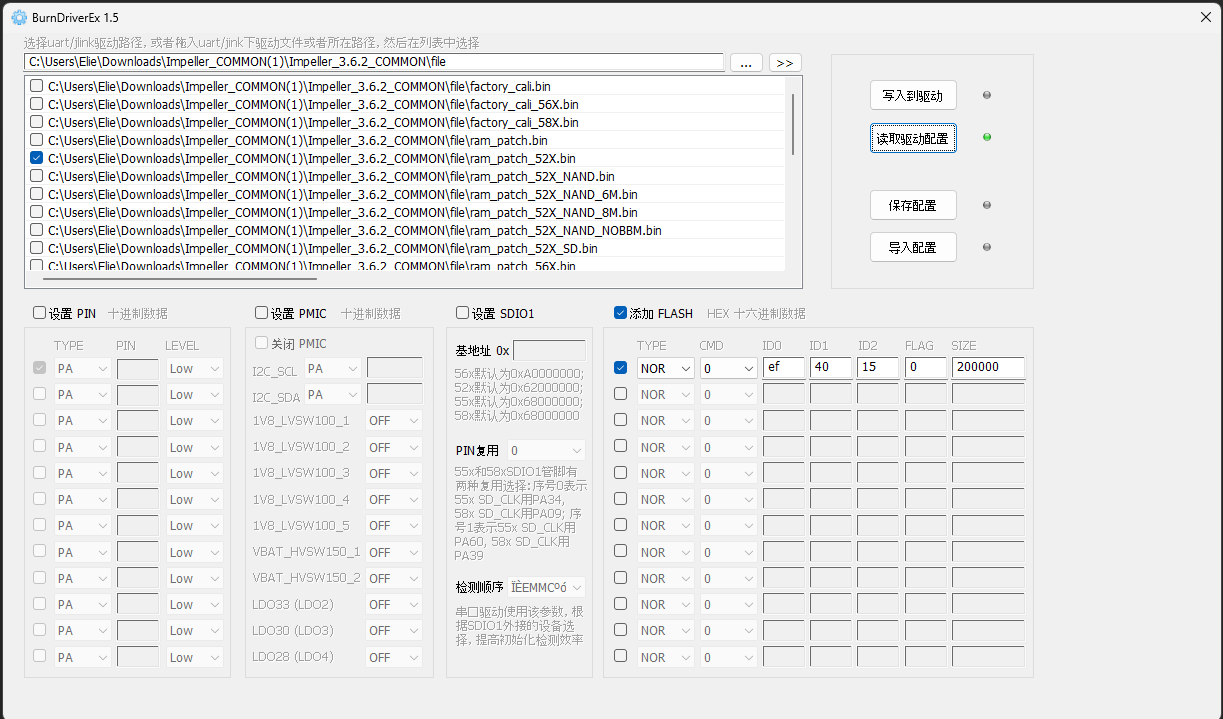
So the problem is that this ram chip is not known by the RAM stub. The solution is simply to use the Impeller tool to patch the RAM stub to include the correct values for this specific NOR chip. I compared this chip with a similar model, and by comparing the two datasheets I ended up with the configuration below :

I then had to clone sftool, and replace the STUB file in the sftool-lib/stub folder with the newly created one. Now both writing and reading works fine !

I’m very glad to hear that you were successful.

Actually, there are now some more modern approaches. The latest version of sftool supports adding new drivers; we can use the --stub-config parameter to specify a JSON file describing the new Flash driver, whose schema is defined at https://github.com/OpenSiFli/sftool/blob/master/sftool/stub_config_schema.json. Alternatively, you can use --stub to specify your patched bin file, so you won’t need to recompile sftool when downloading.

You can edit the stub-config using sftool-gui, which offers a more modern user experience.

We will update the documentation as soon as possible.

1 Like