prev file:C:pictures/test.bin
new path:pictures/test.bin
[Warn]  (28.989, +39)    file_decoder_info: Cannot open: C:pictures/test.bin
        (in lvsf_img_decoder.c line #179)
[Warn]  (28.991, +2)     file_decoder_info: Image get info found unknown src type       (in lvsf_img_decoder.c line #191)
[Warn]  (28.992, +1)     epic_cf_decoder_info: Image get info found unknown src type    (in lvsf_img_decoder.c line #56)
Image width: 355
Image height: 502
Color format: 4
[Warn]  (29.010, +18)    lv_draw_sw_layer_create: Rendering this widget needs LV_COLOR_SCREEN_TRANSP 1  (in lv_draw_sw_layer.c lin[Warn]        (29.011, +1)     refr_obj: Couldn't create a new layer context  (in lv_refr.c line #1241)
[Warn]  (29.015, +4)     file_decoder_info: Src type is wrong: 0
        (in lvsf_img_decoder.c line #185)
[Warn]  (29.016, +1)     file_decoder_info: Image get info found unknown src type       (in lvsf_img_decoder.c line #191)
[Warn]  (29.019, +3)     file_decoder_info: Src type is wrong: 0
        (in lvsf_img_decoder.c line #185)
[Warn]  (29.020, +1)     file_decoder_info: Image get info found unknown src type       (in lvsf_img_decoder.c line #191)
[Warn]  (29.023, +3)     file_decoder_info: Src type is wrong: 0
        (in lvsf_img_decoder.c line #185)
[Warn]  (29.024, +1)     file_decoder_info: Image get info found unknown src type       (in lvsf_img_decoder.c line #191)
[Warn]  (29.027, +3)     file_decoder_info: Src type is wrong: 0
        (in lvsf_img_decoder.c line #185)
[Warn]  (29.028, +1)     file_decoder_info: Image get info found unknown src type       (in lvsf_img_decoder.c line #191)
[Warn]  (29.033, +5)     file_decoder_info: Src type is wrong: 0
        (in lvsf_img_decoder.c line #185)
[Warn]  (29.034, +1)     file_decoder_info: Image get info found unknown src type       (in lvsf_img_decoder.c line #191)
[Warn]  (29.039, +5)     file_decoder_info: Src type is wrong: 0
        (in lvsf_img_decoder.c line #185)
[Warn]  (29.040, +1)     file_decoder_info: Image get info found unknown src type       (in lvsf_img_decoder.c line #191)
[Warn]  (29.042, +2)     file_decoder_info: Src type is wrong: 0
        (in lvsf_img_decoder.c line #185)
[Warn]  (29.044, +2)     file_decoder_info: Image get info found unknown src type       (in lvsf_img_decoder.c line #191)
[Warn]  (29.047, +3)     file_decoder_info: Src type is wrong: 0
        (in lvsf_img_decoder.c line #185)
[Warn]  (29.048, +1)     file_decoder_info: Image get info found unknown src type       (in lvsf_img_decoder.c line #191)
[Warn]  (29.052, +4)     file_decoder_info: Src type is wrong: 0
        (in lvsf_img_decoder.c line #185)
[Warn]  (29.053, +1)     file_decoder_info: Image get info found unknown src type       (in lvsf_img_decoder.c line #191)
[Warn]  (29.055, +2)     file_decoder_info: Src type is wrong: 0
        (in lvsf_img_decoder.c line #185)
[Warn]  (29.056, +1)     file_decoder_info: Image get info found unknown src type       (in lvsf_img_decoder.c line #191)
[Warn]  (29.059, +3)     file_decoder_info: Src type is wrong: 0
        (in lvsf_img_decoder.c line #185)
[Warn]  (29.060, +1)     file_decoder_info: Image get info found unknown src type       (in lvsf_img_decoder.c line #191)
[Warn]  (29.063, +3)     file_decoder_info: Src type is wrong: 0
        (in lvsf_img_decoder.c line #185)
[Warn]  (29.064, +1)     file_decoder_info: Image get info found unknown src type       (in lvsf_img_decoder.c line #191)
[Warn]  (29.067, +3)     lv_draw_sw_layer_create: Rendering this widget needs LV_COLOR_SCREEN_TRANSP 1  (in lv_draw_sw_layer.c line[Warn]       (29.069, +2)     refr_obj: Couldn't create a new layer context  (in lv_refr.c line #1241)
ch[0]voltage=20607;
[970654] E/drv.epic main: print_gpu_error_info
[970674] E/drv.epic main: Epic not ready 2, HW busy =1, ErrorCode 0
[970702] E/drv.epic main: EOF IRQ=0, MASK=1
[970721] E/drv.epic main: VL SRC 200c2196, x0y0x1y1[0,0,354,59]
[970747] E/drv.epic main: L2 SRC 0, x0y0x1y1[0,0,354,59]
[970771] E/drv.epic main: Ezip is ready
[970788] E/drv.epic main: epic_op_history cur=3
[970807] E/drv.epic main: hist[3]
[970822] E/drv.epic main: EPIC_OP_BLENDING_EX   layer_num=2
[970847] E/drv.epic main: #0 cf=0x0,data=0x20020588,total_w=460,area[x0y0(0,400),x1y1(459,459)] frac[0,0]
[970890] E/drv.epic main: color_en=0, rgb[0,0,0], ax=0, L8_tab=0x0, data_size=0xd7a0
[970925] E/drv.epic main: angle=0,scale_xy=1024,1024, pivot_xy=0,0, mirror_hv=0,0
[970958] E/drv.epic main: alpha=255

[970975] E/drv.epic main: #1 cf=0x0,data=0x200791f8,total_w=355,area[x0y0(53,-21),x1y1(407,480)] frac[0,0]
[971018] E/drv.epic main: color_en=0, rgb[0,0,0], ax=0, L8_tab=0x0, data_size=0x0
[971051] E/drv.epic main: angle=0,scale_xy=1024,1024, pivot_xy=177,251, mirror_hv=0,0
[971086] E/drv.epic main: alpha=255

[971102] E/drv.epic main: output cf=0x0,data=0x200205f2,total_w=460,area[x0y0(53,400),x1y1(407,459)] frac[0,0]
[971147] E/drv.epic main: color_en=0, rgb[0,0,0], ax=0, L8_tab=0x0, data_size=0xd7a0
[971181] E/drv.epic main: wait_gpu_done timeout(-2)? err=-2
Assertion failed at function:wait_gpu_done, line number:788 ,(0)
Previous ISR enable 0
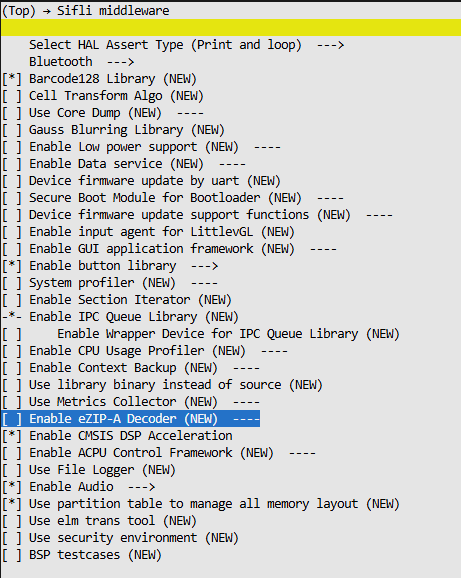
报错文件长这样,是不是我没开这个宏导致的,但是如果我打开会导致报错找不到一个app_mem.h文件,虽然上面有个好人给我提供的包里有这份头文件,但是添加了还会报其他宏错误